Build Your Own AI-Powered Slack Bot with the Laravel AI SDK

At Tighten, we use Slack for all our internal communication. It's where we chat, share ideas, and keep everyone up to date. And today, with AI becoming increasingly present in our workflows, the question writes itself:
What if an AI agent could join those conversations?
Could a little bot answer questions, find information, and help with tasks without anyone ever having to leave Slack? The answer is ... of course!
In fact, Anthropic recently released a Slack app called Claude Tag that does exactly that: mention the bot in any channel and it joins the discussion. You and your teammates can interact with it, delegate tasks, have it remember information, or process data. Anything Claude can do, it can now do right from Slack.
Claude Tag is great, but it comes with a couple of trade-offs:
- The first is vendor lock-in. This is an Anthropic app, so you're tied to Anthropic's ecosystem, models, and pricing. If you ever want to switch to another provider, like OpenAI or Gemini, it's not as simple as changing a configuration value. You have to decide whether switching models is worth giving up the workflow you've already built around that bot.
- The second is memory. Your conversation history, documents, and everything the bot remembers live on Anthropic's servers. You don't control that data, you can't inspect it directly, and you can't reuse it outside the app. As far as you're concerned, it's a black box that you can only interact with through the bot itself.
That's why today we'll explore how to build our own AI-powered Slack bot with the Laravel AI SDK and how doing so addresses those two limitations:
- First, we'll keep the AI provider interchangeable. Switching models, or even providers, is as simple as updating an attribute on the agent or a line in a config file.
- Second, we'll build our own memory system with a simple RAG pipeline. Our embeddings will live in our own database, so we decide what the bot remembers and how that information is retrieved.
By the end of this article, you'll have a Slack bot that can answer questions, execute tasks, and retrieve information from your own knowledge base. All while staying under your control.
Let's dive in!
Overview
- Creating Our AI Agent
- Creating the Webhook
- Creating the Slack App
- Saying Hello
- Remembering Conversations
- Following the Thread
- Searching Past Messages
- Final Result
- In Closing
Creating Our AI Agent
In a previous article, we covered the basics of the Laravel AI SDK, but let's do a quick refresher.
Head over to your Laravel project's root folder, install the package, and publish its config:
composer require laravel/ai
php artisan vendor:publish --provider="Laravel\Ai\AiServiceProvider"
php artisan migrate
The SDK reads each AI provider's credentials from config/ai.php, which in turn pulls them from your .env file. Add the API key for whichever provider you plan to use. For this tutorial we'll use OpenAI:
AI_DEFAULT=openai
AI_DEFAULT_FOR_EMBEDDINGS=openai
OPENAI_API_KEY=sk-proj-XXXXXXX
We are ready to generate our agent! Let's call it SlackBot:
php artisan make:agent SlackBot
This creates the app/Ai/Agents/SlackBot.php file. It's a simple class where we can customize our agent.
- The
#[Provider]and#[Model]attributes determine which AI provider and model to use. For this example, we'll use OpenAI's GPT-5.4, but you can choose your favorite. You can even swap models or providers at any time simply by updating these attributes. - The
instructionsmethod should return a string containing the basic instructions we want the agent to follow. You can ask it to be concise, speak in Spanish, always tell jokes, or anything else you want. It's up to you! For this example, we'll keep things simple. - For now, leave
messagesandtoolsas they are. We'll come back to them later.
namespace App\Ai\Agents;

use Laravel\Ai\Attributes\Model;
use Laravel\Ai\Attributes\Provider;
use Laravel\Ai\Contracts\Agent;
use Laravel\Ai\Contracts\Conversational;
use Laravel\Ai\Contracts\HasTools;
use Laravel\Ai\Contracts\Tool;
use Laravel\Ai\Enums\Lab;
use Laravel\Ai\Messages\Message;
use Laravel\Ai\Promptable;
use Stringable;

#[Provider(Lab::OpenAI)]
#[Model('gpt-5.4')]
class SlackBot implements Agent, Conversational, HasTools
{
    use Promptable;

    /**
     * Get the instructions that the agent should follow.
     */
    public function instructions(): Stringable|string
    {
        return 'You are a concise, friendly, and helpful Slack bot.';
    }

    /**
     * Get the list of messages comprising the conversation so far.
     *
     * @return Message[]
     */
    public function messages(): iterable
    {
        return [];
    }

    /**
     * Get the tools available to the agent.
     *
     * @return Tool[]
     */
    public function tools(): iterable
    {
        return [];
    }
}
With the agent defined, we can send our first prompt. Fire up Tinker and run:
echo (new App\Ai\Agents\SlackBot)->prompt('Write a haiku about Laravel.')->text;
Did you get a haiku? Great!
Now, instead of sending prompts manually, we want the agent to respond to messages coming from Slack.
Creating the Webhook
We need a public route that Slack can hit to notify us of any new messages. Slack sends a POST request, something like this:
{
  "token": "z26uFbvR1xHJEdHE1OQiO6t8",
  "team_id": "T0123ABCD",
  "api_app_id": "A0123ABCD",
  "type": "event_callback",
  "event_id": "Ev0123ABCD",
  "event_time": 1755180000,
  "event": {
    "type": "message",
    "channel": "C0123ABCD",
    "user": "U0123ABCD",
    "text": "<@U0BOTID> what did we decide about the deploy process?",
    "ts": "1755180000.123456",
    "event_ts": "1755180000.123456"
  }
}
Most of that outer envelope is bookkeeping. The interesting part is event, and within it, the four keys we need:
textis the message itself, mention included.channelis where it was posted, so we know where to reply.useris who wrote it.tsis the message's timestamp, which doubles as its ID. Slack uses it to thread replies.
Let's create a controller to receive these events. It will only ever do one thing, so an invokable controller is a good fit:
php artisan make:controller SlackEventsController --invokable
Let's wire it up in our routes file:
use App\Http\Controllers\SlackEventsController;
use Illuminate\Foundation\Http\Middleware\PreventRequestForgery;
use Illuminate\Support\Facades\Route;

Route::post('/slack/events', SlackEventsController::class)
  ->withoutMiddleware(PreventRequestForgery::class);
And write the logic:
namespace App\Http\Controllers;

use Illuminate\Http\JsonResponse;
use Illuminate\Http\Request;

class SlackEventsController extends Controller
{
  public function __invoke(Request $request): JsonResponse
  {
    if ($request->input('type') === 'url_verification') {
      return response()->json(['challenge' => $request->input('challenge')]);
    }

    logger()->info('From Slack: ', $request->all());

    return response()->json();
  }
}
- Before it sends a single event, Slack posts a
url_verificationrequest containing a randomchallengestring and expects us to echo it back. We handle that first. - Then, we just log the event. We'll implement the agent here in just a moment.
In production, you should also verify Slack's request signature so that only Slack can call this endpoint. The Slack docs cover this.
Making the Webhook URL Public
One issue remains: Slack can't reach your local endpoint. It needs to be publicly accessible before Slack will accept it, which means we need to either:
- a) Use ngrok or Cloudflare Tunnels to expose our local app to the internet, or
- b) Deploy our application. Laravel Cloud is the fastest way to do that, and it gives us two things we'll need later: a Postgres database with pgvector already installed and a fast queue worker.
Whichever option you choose, keep the full URL of your /slack/events webhook handy. You'll need it in the next step.
Creating the Slack App
With our webhook publicly available, we are ready to create our Slack app. Log in to Slack and follow this link:
You should see a modal like this:
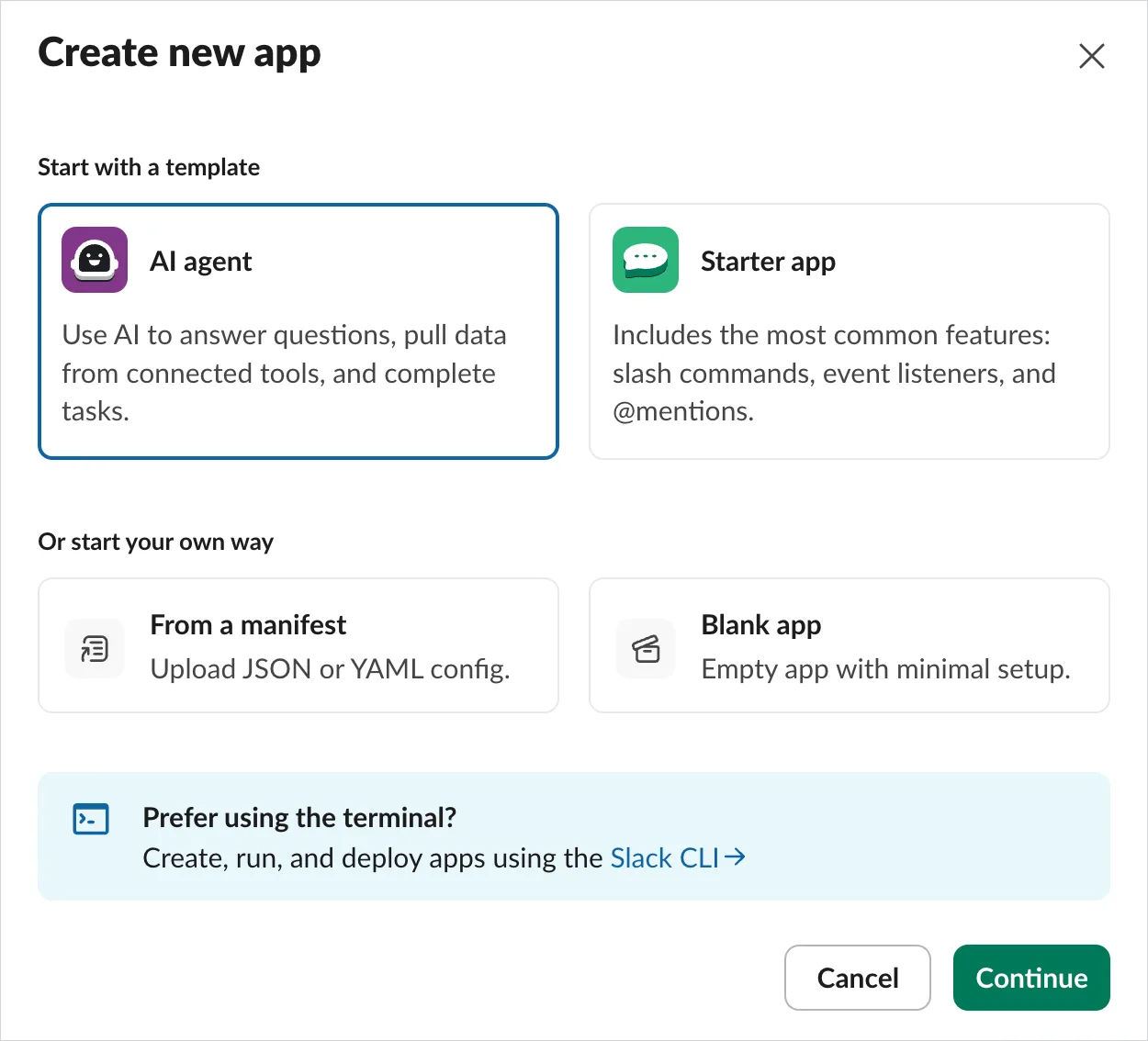
Hey, one of the options is literally "AI agent"! True, but that's handy for the Slack bot SDK. We want something custom, so let's click on the third option, "From a manifest".
This option lets us paste a configuration with the scopes we need and the list of events we want to listen to. Click "Continue" and paste the following JSON:
{
  "display_information": {
    "name": "Larabot",
    "description": "An AI-powered Slack bot built with the Laravel AI SDK"
  },
  "features": {
    "bot_user": {
      "display_name": "Larabot",
      "always_online": true
    }
  },
  "oauth_config": {
    "scopes": {
      "bot": ["chat:write", "channels:history"]
    }
  },
  "settings": {
    "event_subscriptions": {
      "request_url": "https://demo-laravel-tag.laravel.cloud/slack/events",
      "bot_events": ["message.channels"]
    }
  }
}
Remember to replace request_url with your own. Slack calls that URL the moment you submit the manifest, expecting the challenge string back. If it fails, double-check that the webhook endpoint is reachable.
The rest is short because we're asking for very little:
chat:writelets the bot post messages.channels:historylets it read the messages in the channels it belongs to.message.channelsis the only event we subscribe to, so Slack notifies us of every message posted in those channels.
Every message may sound like a lot, and it is. Slack also offers an app_mention event that fires only when somebody tags the bot, which is tempting because it's so much quieter. But a bot that answers only when tagged gets tiring fast, and we want ours to follow a conversation the way Claude Tag does. We'll do the filtering on our side.
Slack will ask you in which workspace you'd like to install this app. Pick the workspace you want.
Click "Next" and finally "Create and Install". Slack will ask for your permission to add the app to the workspace. Accept and ... you're done! Click "Go to App Settings" to land on the app's homepage.
From there, click on the "Install App" link in the sidebar. It will take you to a page where you'll see the Bot User OAuth Token. Copy it and paste it into your .env.
SLACK_BOT_TOKEN=xoxb-your-token
While we're collecting credentials, we need one more. Since we're listening to every message, Slack won't tell us when the bot is mentioned; we have to spot its user ID in the text ourselves. Ask the API for it:
curl -s -H "Authorization: Bearer xoxb-your-token" https://slack.com/api/auth.test
The user_id in that response is what we want. Store it in your .env like this:
SLACK_BOT_USER_ID=U0BQ6PHN6XX
Then expose both through config/services.php:
'slack' => [
  'bot_token' => env('SLACK_BOT_TOKEN'),
  'bot_user_id' => env('SLACK_BOT_USER_ID'),
  'notifications' => [...]
],
Saying Hello
Our bot exists, but it's not in any channel yet. Slack only delivers events from channels the bot has joined, so head over to your workspace and invite it:
/invite @Larabot
Now say anything in that channel. Nothing will happen in Slack, but check your application logs and you should find the payload we looked at earlier, with your own message in the text key. Our webhook works!
Everything reaches us now, so the first job is deciding what deserves an answer. For the moment that's simple: a message that mentions the bot.
namespace App\Http\Controllers;

use Illuminate\Http\Client\Factory as Http;
use Illuminate\Http\JsonResponse;
use Illuminate\Http\Request;

class SlackEventsController extends Controller
{
  public function __invoke(Request $request, Http $http): JsonResponse
  {
    if ($request->input('type') === 'url_verification') {
      return response()->json(['challenge' => $request->input('challenge')]);
    }

    $event = $request->input('event', []);

    // Only process plain messages from humans.
    // Skip edits, joins, pins, and other message subtypes.
    if (($event['type'] ?? null) !== 'message'
      || isset($event['subtype'])
      || isset($event['bot_id'])) {
      return response()->json();
    }

    $botId = config('services.slack.bot_user_id');

    // Only respond when someone explicitly mentions our bot.
    if (! str_contains($event['text'] ?? '', "<@{$botId}>")) {
      return response()->json();
    }

    // Reply
    $http->withToken(config('services.slack.bot_token'))
      ->post('https://slack.com/api/chat.postMessage', [
        'channel' => $event['channel'],
        'text' => 'Hello, world!',
        'thread_ts' => $event['thread_ts'] ?? $event['ts'],
      ]);

    return response()->json();
  }
}
Posting the reply is a single call to chat.postMessage with our bot token. The interesting parameter is thread_ts:
- If Slack includes a
thread_ts, the user mentioned the bot inside an existing thread, so we reply there. - Otherwise, we use the timestamp of the original message (
ts). Slack reads that as "reply to this message" and creates a new thread instead of posting into the channel.
It's a small detail, but it makes the bot behave much more naturally. From this point on, every conversation stays neatly contained in its own thread.
Mention the bot again and it should say hello right back.
Agent in Action
Slack expects an answer within three seconds and retries the request if it doesn't get one. Since an AI reply could take longer than that, let's move the inline reply to a job.
php artisan make:job HandleSlackMessage
This job should:
- Strip the
<@Larabot>mention out of the text, so the model doesn't get confused by it. - Prompt the
SlackBotagent with the text from the message. - Finally, reply using Slack's API.
namespace App\Jobs;

use App\Ai\Agents\SlackBot;
use Illuminate\Contracts\Queue\ShouldQueue;
use Illuminate\Foundation\Queue\Queueable;
use Illuminate\Support\Facades\Http;

class HandleSlackMessage implements ShouldQueue
{
  use Queueable;

  public function __construct(public array $event) {}

  public function handle(): void
  {
    $text = trim(preg_replace('/<@[^>]+>/', '', $this->event['text']));

    $response = (new SlackBot)->prompt($text);

    Http::withToken(config('services.slack.bot_token'))
      ->post('https://slack.com/api/chat.postMessage', [
        'channel' => $this->event['channel'],
        'text' => $response->text,
        'thread_ts' => $this->event['thread_ts'] ?? $this->event['ts'],
      ]);
  }
}
That's it!
Since the job runs on the queue, something needs to process it. Locally that's php artisan queue:work. On your server you might use Horizon, and on Laravel Cloud you can use managed queues.
Now, go back to the controller and replace the inline reply with the job dispatch:
HandleSlackMessage::dispatch($event);
Mention the bot now, and it should reply with a real answer from GPT-5.4. Our Slack bot is alive!
Remembering Conversations
Ask a follow-up in the same thread, though, and ... it won't remember what you asked before. Every response feels like a new conversation, with no account of what has been said in the thread so far.
The Laravel AI SDK has a fix for this: the RemembersConversations trait. Let's add the trait to our agent:
use Laravel\Ai\Contracts\Agent;
use Laravel\Ai\Concerns\RemembersConversations;
use Laravel\Ai\Contracts\Conversational;

class SlackBot implements Agent, Conversational
{
  use Promptable, RemembersConversations;

  // ...
}
While you're there, also remove the messages method. Otherwise, it will override the method provided by the trait.
Now we need to set up a model. The SDK ties every conversation to an owner, an Eloquent model using the HasConversations trait. You're free to use your User model if the people in your Slack workspace match the people in your users table. For this example, we'll build a dedicated one, SlackUser, keyed by the user value Slack sends us.
This is the migration:
Schema::create('slack_users', function (Blueprint $table) {
  $table->id();
  $table->string('slack_id')->unique();
  $table->timestamps();
});
And here's the model:
use Illuminate\Database\Eloquent\Model;
use Laravel\Ai\Concerns\HasConversations;

class SlackUser extends Model
{
  use HasConversations;

  protected $guarded = [];
}
One piece is still missing: Slack thinks in threads, the SDK thinks in conversations, and nothing connects the two. A small SlackConversation model mapping a thread_ts to a conversation_id will do. Migration:
Schema::create('slack_conversations', function (Blueprint $table) {
  $table->id();
  $table->string('thread_ts')->unique();
  $table->string('conversation_id')->nullable();
  $table->timestamps();
});
And model:
use Illuminate\Database\Eloquent\Model;

class SlackConversation extends Model
{
  protected $guarded = [];
}
thread_ts is unique, since each thread maps to a single conversation. conversation_id is nullable because the SDK only assigns one once we've sent the first message.
Now the HandleSlackMessage job looks up the thread and saves the returned ID back, so the two stay in sync:
- If we've seen the thread before,
continue()picks up where it left off. - If we haven't,
forUser()starts a fresh conversation, and the response comes back with a newconversationId.
public function handle(): void
{
  $text = trim(preg_replace('/<@[^>]+>/', '', $this->event['text']));

  $user = SlackUser::firstOrCreate(['slack_id' => $this->event['user']]);

  $thread = $this->event['thread_ts'] ?? $this->event['ts'];
  $mapping = SlackConversation::firstOrNew(['thread_ts' => $thread]);

  $agent = $mapping->conversation_id
    ? (new SlackBot)->continue($mapping->conversation_id, as: $user)
    : (new SlackBot)->forUser($user);

  $response = $agent->prompt($text);

  $mapping->conversation_id = $response->conversationId;
  $mapping->save();

  Http::withToken(config('services.slack.bot_token'))
    ->post('https://slack.com/api/chat.postMessage', [
      'channel' => $this->event['channel'],
      'text' => $response->text,
      'thread_ts' => $this->event['thread_ts'] ?? $this->event['ts'],
    ]);
}
The bot now follows a thread from start to finish. The best part? The entire history lives in our database instead of with a third party.
Following the Thread
There's still a catch. You have to mention the bot in every single message to get a reply, which can be cumbersome. Claude Tag doesn't work that way: once it's in a thread, it reads every reply without being tagged again.
Let's mimic that. Every message in the channel already reaches our controller, so we don't need to touch the Slack app at all. We just need to widen the condition: answer when the bot is mentioned, or when the message lands in a thread we're already tracking.
That second case is exactly what our SlackConversation model knows about. Let's edit our controller:
namespace App\Http\Controllers;

use App\Jobs\HandleSlackMessage;
use App\Models\SlackConversation;
use Illuminate\Http\JsonResponse;
use Illuminate\Http\Request;

class SlackEventsController extends Controller
{
  public function __invoke(Request $request): JsonResponse
  {
    if ($request->input('type') === 'url_verification') {
      return response()->json(['challenge' => $request->input('challenge')]);
    }

    $event = $request->input('event', []);

    if (($event['type'] ?? null) !== 'message'
      || isset($event['subtype'])
      || isset($event['bot_id'])) {
      return response()->json();
    }

    $botId = config('services.slack.bot_user_id');
    $mentioned = str_contains($event['text'] ?? '', "<@{$botId}>");

    $thread = $event['thread_ts'] ?? null;
    $inKnownThread = $thread && SlackConversation::where('thread_ts', $thread)->exists();

    if (! $mentioned && ! $inKnownThread) {
      return response()->json();
    }

    HandleSlackMessage::dispatch($event);

    return response()->json();
  }
}
$mentionedis the cold start: someone pulls the bot into a fresh conversation.$inKnownThreadis the follow-up: a reply lands in a thread we've already answered in, so we stay in it. The lookup is a single indexed query onthread_ts, so we're still well inside Slack's three-second window.- Everything else, which is most channel chatter, we let pass.
The job doesn't change one line. It already keys off the thread and strips any mention from the text, so a bare follow-up flows through exactly like a mention did. All we changed is what we let through the door.
Tag the bot once, then just talk to it.
Searching Past Messages
Conversation memory works! But only within a single thread.
Picture this: you ask the bot to create a presentation, and you go back and forth until it's finished. The next day, in a brand-new thread, you ask it to email that presentation to an investor. Without memory, the bot has no idea which presentation you mean. With it, you get something like:
If you don't need that, feel free to skip this section. If you do, stay tuned: we're implementing memory using RAG (Retrieval Augmented Generation).
We explored RAG in a previous article. Here's the concept in a nutshell:
- Every time the bot sees a message, we turn it into a vector: a list of numbers representing the message's meaning. We store that vector alongside the original text.
- Messages about similar topics produce similar vectors, even when they use completely different words. Instead of searching for exact text matches, we look for the closest vectors to find content that's semantically related.
- When a new question comes in, we generate a vector for it, find the most similar stored vectors, and send their messages to the LLM as additional context.
- The LLM then answers using both the question and the retrieved context, letting it respond with information it wouldn't otherwise know.
Let's create a table for this, slack_messages. It needs a vector column, which requires PostgreSQL with the pgvector extension. If you deployed to Laravel Cloud, you already have it.
Schema::ensureVectorExtensionExists();

Schema::create('slack_messages', function (Blueprint $table) {
  $table->id();
  $table->text('text');
  $table->vector('embedding', dimensions: 1536);
  $table->timestamps();
});
To turn raw text into a vector we use an embedding model, which is separate from the chat model we've been swapping around. Which provider handles embeddings is set in config/ai.php (default_for_embeddings, OpenAI by default), and each provider picks its own model unless you override it. At the time of writing, OpenAI's default is text-embedding-3-small. That model has 1536 dimensions, so that's what we declare in the migration.
The SlackMessage model casts the embedding to an array:
namespace App\Models;

use Illuminate\Database\Eloquent\Model;

class SlackMessage extends Model
{
  protected $guarded = [];

  protected function casts(): array
  {
    return [
      'embedding' => 'array',
    ];
  }
}
Generating the embedding takes one line, thanks to the SDK's toEmbeddings() helper. We store both sides of the exchange in the HandleSlackMessage job, right after the agent replies:
foreach ([$text, $response->text] as $message) {
  SlackMessage::create([
    'text' => $message,
    'embedding' => Str::of($message)->toEmbeddings(),
  ]);
}
Why after? Saving the question before we answer it would allow it to match itself during its own turn, which is a strange kind of déjà vu. And storing the bot's answer also means that future searches can surface what the bot actually said, not just what somebody asked.
Now every message is a searchable vector. To let the agent use them, we hand it the SDK's SimilaritySearch tool pointed at our model:
use Laravel\Ai\Contracts\HasTools;
use Laravel\Ai\Tools\SimilaritySearch;

class SlackBot implements Agent, Conversational, HasTools
{
  use Promptable, RemembersConversations;

  // ...

  public function tools(): iterable
  {
    return [
      SimilaritySearch::usingModel(
        SlackMessage::class,
        'embedding',
        minSimilarity: 0.3,
        limit: 5,
      ),
    ];
  }
}
When a question calls for it, the agent decides on its own to search, retrieves the closest matches, and works them into its answer. Our bot has a memory now, and every byte of it sits in a database we control.
As written, that search spans every stored message. For a real-world app you'll want to scope it, perhaps adding a
channelcolumn and filtering on it, so the bot never pulls a private channel's messages into an unrelated thread.
Final Result
We built the job up a piece at a time, so here's the finished handle() method with everything in place:
use App\Ai\Agents\SlackBot;
use App\Models\SlackConversation;
use App\Models\SlackMessage;
use App\Models\SlackUser;
use Illuminate\Support\Facades\Http;
use Illuminate\Support\Str;

public function handle(): void
{
  $text = trim(preg_replace('/<@[^>]+>/', '', $this->event['text']));

  $user = SlackUser::firstOrCreate(['slack_id' => $this->event['user']]);
  $thread = $this->event['thread_ts'] ?? $this->event['ts'];
  $mapping = SlackConversation::firstOrNew(['thread_ts' => $thread]);

  $agent = $mapping->conversation_id
    ? (new SlackBot)->continue($mapping->conversation_id, as: $user)
    : (new SlackBot)->forUser($user);

  $response = $agent->prompt($text);

  $mapping->conversation_id = $response->conversationId;
  $mapping->save();

  foreach ([$text, $response->text] as $message) {
    SlackMessage::create([
      'text' => $message,
      'embedding' => Str::of($message)->toEmbeddings(),
    ]);
  }

  Http::withToken(config('services.slack.bot_token'))
    ->post('https://slack.com/api/chat.postMessage', [
      'channel' => $this->event['channel'],
      'text' => $response->text,
      'thread_ts' => $thread,
    ]);
}
A few models, one controller, one job. That's the whole bot!
In Closing
We built our own Slack bot. It's pretty basic, sure, but it gets the job done, and you can take it much further:
- You can add tools, sub-agents, and more.
- You can download attachments from Slack and have the bot read them.
- You can even wire up a speech-to-text and text-to-speech pipeline, so you can send it audio messages and have it reply with audio of its own.
And remember the two trade-offs we set out to avoid? Switching from GPT-5.4 to Claude or Gemini is a one-line change to an attribute on the agent or in our .env file. And every conversation, every embedding, every message the bot remembers is sitting in your own Postgres database, and you can query it, export it, or delete it whenever you feel like it.
With the Laravel AI SDK, the sky's the limit. If you build any of this, please let us know!
Until next time.
in your inbox:
let’s talk.
Thank you!
We appreciate your interest.
We will get right back to you.